Curriculum, Curriculum Resource, Family, High School, Homeschool, Homeschool Family, Homeschool Planner, Homeschool Record Keeping, Middle School, Parenting, Teaching Resources

How Homeschool Records Saved Me When I Needed a Transcript Fast

We received Homeschool Records for our honest review!

Recently I was asked to provide a transcript for my son in order for him to apply to a prestigious academic program. I was so relieved that I had already been using Homeschool Records to track his academics through his 7th/8th grade year, especially since he did a hybrid school year last year and is again this school year for 8/9th. Having his records already organized meant that I wasn’t scrambling to piece things together at the last minute. You may also recall I reviewed Homeschool Records last year. We are still using it and I am so glad we are.
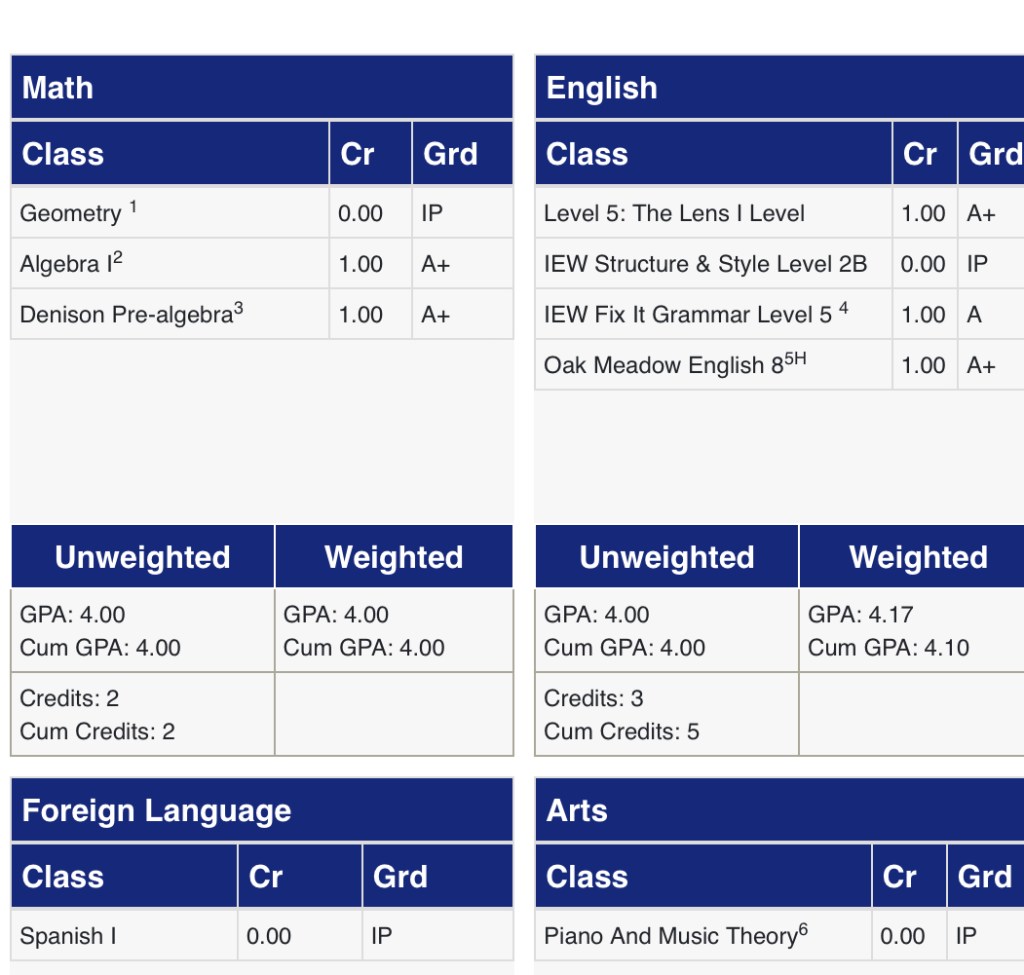
When I needed to produce his transcript, Homeschool Records was a life-saver. With just a click of a button, I was able to generate a professional, impressive transcript that looked exactly like what the admissions people expected. No frantic formatting, no last-minute data entry, no worries about how to present hybrid/homeschool credits. I felt confident handing it over.

In-Depth Overview of Homeschool Records

Here’s a deeper dive into how Homeschool Records works, what it offers, and who it best serves.

What Homeschool Records does

  • It’s a web-based platform that allows you to “create, manage & store all your homeschool records in one place” designed especially for Grades 8-12.
  • It covers key record-keeping elements: transcripts & reports, course descriptions, attendance tracking, volunteer/community service hours, reading logs, instructional hours.
  • The workflow: you input your student’s courses (with descriptions, grades, credits) once. Then the system uses that information to automatically build reports, including transcripts.
  • Recently I discovered the new feature of being able to duplicate classes a game-changer for us. For example, when planning the spring term I could duplicate a class from the fall term and just update the grade or status. Huge time saver.
  • Also features like marking a course as “in progress” or “planned” are built in, so the transcript can reflect “this course is ongoing” or “this course is scheduled for next term” which is perfect for hybrid/homeschool students who may have non-traditional sequencing.
  • Sharing courses with other students in your account, this is a great option for multi-family students.
  • The newest launch: a Transcript Evaluation Service — meaning the platform is now offering a review/validation of your transcript to help ensure it meets college/university expectations (in my case, that give me extra peace of mind) small additional fee applies.

Why it was ideal for our context

  • My son’s hybrid school year: Because we were using both homeschool curriculum and hybrid/in-class elements, keeping everything organized was complex. Homeschool Records let me track each component (in-class, homeschool days, online days) under one roof.
  • Middle school into early high school transition: Since we’re moving from 7th/8th grade into higher grades, establishing good records now means less stress later when high school officially begins.
  • Efficiency: I literally spent only minutes entering course descriptions and grades; the heavy lifting (formatting, report generation) was handled.
  • Planning & progress-monitoring: The duplicate-class feature helped me plan ahead and see my son’s progress over time (term to term).
  • Professional look: The transcript output looked clean and credible exactly what is needed when you’re submitting to an academic program that expects high-school-level documentation.
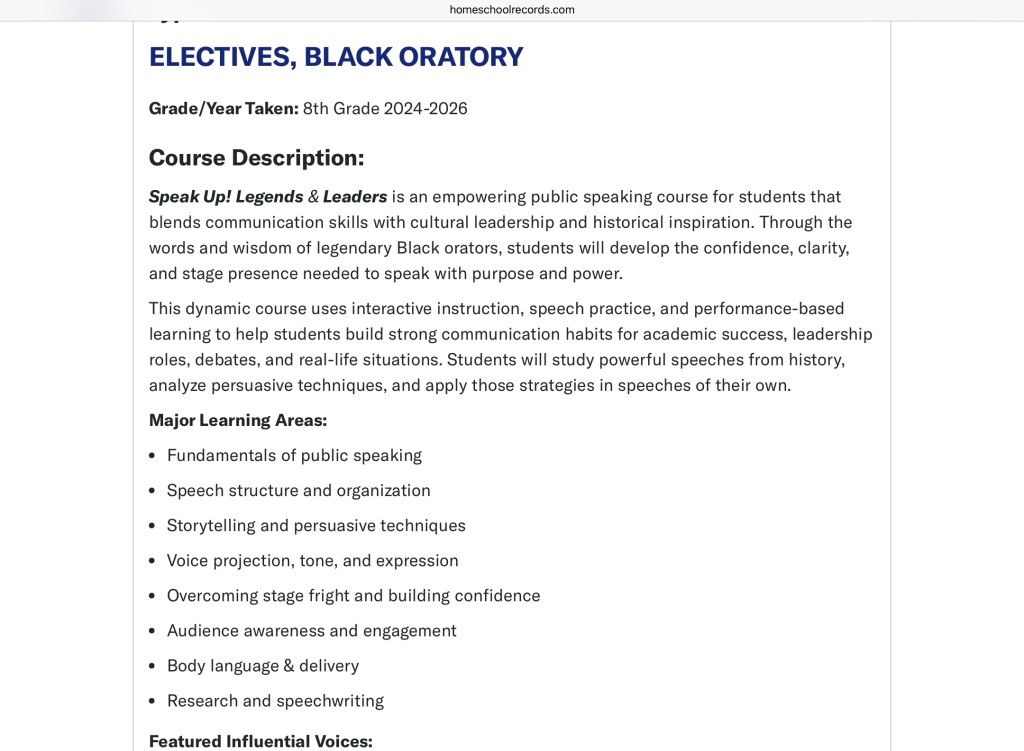
Screenshot

Who would benefit from using Homeschool Records

  • Homeschooling families whose students are entering high-school years (Grades 8-12) and may need transcripts for college, programs, scholarships.
  • Hybrid homeschool families (mix of in-person, online, homeschool days) who want one place to track all academic work.
  • Homeschool parents who want minimal fuss: you enter the data and the system does the heavy lifting — ideal for busy parents who don’t want to become transcript-formatting experts.
  • Families who want to plan ahead: Being able to mark planned/in-progress courses means you can build a roadmap from middle school through high school, making sure you’re on track.
  • Those wanting professional documentation: For admissions, scholarships, evaluations a polished transcript matters, and this platform delivers.

Exciting New Dual Enrollment Feature

And now, Homeschool Records has taken it a step further with the new Dual Enrollment Planner! This feature helps families seamlessly track and organize college-level courses taken during high school, including credits, grades, and institutions. It ensures your student’s dual enrollment experience is clearly documented and professionally displayed on their transcript something that really catches the eye of admissions officers.

The Breakdown

One of the biggest concerns for homeschool parents is creating a strong high school transcript one that truly reflects your student’s hard work and individuality.

What I’ve found with Homeschool Records is that it keeps me accountable for everything curriculum, credits, track volunteer hours, extracurricular activities, electives, and even helping my son build his student resume.

Colleges today want to see more than just academics. They’re looking for well-rounded individuals, and Homeschool Records helps make that possible. Their professional transcripts have just the right pop of color, helping your student’s transcript stand out from the typical black-and-white ones that often get lost in a stack.

One of my favorite features is the ability to add detailed course descriptions when entering classes. This is such a valuable tool! Along with the transcript, you can submit these professional course descriptions to give admission counselors a real understanding of what your student studied and how your homeschool operates.

It’s simply not enough anymore to just meet graduation requirements. Today’s colleges want context and depth they want to know what your student learned and how. After talking with several admissions counselors myself, they all said the same thing: they love when families provide more information about the courses.

Homeschool Records truly takes the worry and anxiety out of transcript creation. It even automatically tracks credits for you! This platform has made the high school documentation process so much easier and far more professional.


My Final Thoughts

If I were to sum it up: Homeschool Records has been one of the best investments we made in our homeschooling infrastructure. Knowing that when that transcript request came, I was ready is priceless. The recent addition of the duplicate-class feature truly made planning for the spring term easier, and the ability to note “in progress” or “planned” courses gives flexibility that’s perfect for the hybrid model.

In short: you (the parent) spend a few minutes entering your child’s information (course name, description, grade, credit, status) and you’re done. The platform handles the rest. It works now as a tracker for 8th grade, but it’s also a long-term solution for tracking from 8th through 12th grade, making it an excellent system for the next several years of our son’s academic journey. The low cost is worth every dime!!


6th Grade, AI Learning, Artificial Intelligence, Critical Thinking and Logic, Curriculum, Education, Homeschool, Middle School, Reviews, Teaching Resources

Khan Academy: Khanmigo First Look

Hey, guys, I’m jumping on right now to bring you a review that’s probably not like our typical reviews. We were given the opportunity to review the new Khan Academy Khanmigo. If you aren’t familiar with Khanmigo it is Khan Academy’s new AI teacher assistant and learner tutor. I’m gonna be totally honest with you I was a little bit skeptical about the whole AI technology being used in my homeschool. Like many families, we do have several Alexa devices in our home. and So when we were given an opportunity to try out the new Khan Academy Khanmigo AI resource I jumped at the chance to just check it out. 

As of right now, the Khanmigo is not available to the general public but you can eagerly put your name on a waitlist. The platform that we were using was the beta platform. We shared the teacher dashboard but there is an area for learners. Once fully launched Khanmigo will be available to students on their dashboards. Khanmigo’s goal is to be an assistant teacher to help you plan creative lessons. For the student, it is used to be a progressive tutor in which the student facilitates the learning and Khanmigo adapts and tutors.

Khanmigo is a wonderful resource from what I can tell right now. There are lots of prompts and details to tell you how the system works. The AI is very responsive, honestly, I didn’t run into any problems using Khanmigo. I was really impressed at how thoroughly the system works.

Teacher Dashboard

The teacher dashboard has and on the left-hand side of ten activities to choose from:

  • Chat with GPT-4 (Your AI buddy)
  • Class Snapshot ( Lets you see what going on in your classes)
  • Summarize student chat history ( lets you see how your students have been chatting with Khanmigo)
  • Refresh my knowledge ( Lets you pick topics and grade levels you need refreshing on)
  • Create a lesson hook and write exit ticket questions
  • Options for creating lesson plans
  • Write learning objectives
  • Co-create a rubric

The dialogue box is to the right of the activities and this is where you will see your interactions. How I tested Khanmigo’s lesson planning skills is I asked for the AI to create a lesson plan for Meso- America. I was completely blown away. AI the system gave me a complete breakdown of:

  • Objectives/Standards
  • Essential Questions
  • Materials
  • Lesson Hook
  • Lesson Activities
  • Assessment
  • Higher-Order Thinking Questions
  • Extensions Activities
  • Differentiation

Take your teaching to the next level with AI-guided lesson planning and insightful student feedback. Khanmigo frees up our educators’ most limited resource—time.

Khan Academy

Fellow educators let me just tell you, I WAS SHOCKED !!! I want to take this time and thank Khan Academy for saving me HOURS of research and agony. The systems even referenced activities to use within Khan Academy. I then further tested the learning objectives activity on the same topic and the AI helped me come up with and pinpoint my personal own objectives for this topic for my son.

For Learners

The learner’s section of the dashboard also includes a welcome screen and on the left side there were twenty activities that included:

  • Brainstorm admissions essay
  • Grammar and Mechanic check
  • Tutoring Math, Science, Humanities
  • Ignite your curiosity
  • Practice general subjects
  • Practice for Elementary, Middle School, High School, AP Exams, College
  • Debate topics for Elementary, Middle School, and High School
  • Chat with Historical and Literary characters
  • Story writing and writing prompts
  • Vocabulary
  • College and academic and career growth

My son took his turn at Khanmigo and so far he has studied Indigenous Tribes, Civil War, Juneteenth, and Indigenous mounds. He has also used writing prompts and debate topics for middle schoolers. He has also used Khanmigo to help him dig deeper into his physics and history lessons.

Khanmigo mimics a writing coach by giving prompts and suggestions to move students forward as they write, debate, and collaborate in exciting new ways.

Khan Academy

Now I know what you’re thinking is Khanmigo doing all the work for kids and teachers is it taking away the ability to research and be creative. On the contrary, Khanmigo gives students and teachers the skeleton it encourages them to dig deeper into what they have asked about or created. Students are encouraged to use the resources within Khan Academy as well as outside resources. Khanmigo is not about giving your students answers they are testing their knowledge and building upon it. I appreciate that when students type in answers if the answers are wrong or they come close to being correct the system is very encouraging and they help them learn about the topic rather than listing a bunch of facts and historical events. 

Khan Academy Khanmigo receives a huge thumbs up from both my son and myself. There are so many capabilities of this platform. The things I took away from reviewing this Khanmigo are that it saves time, and takes my lesson planning to a new level. I definitely see Khanmigo as an assistant teacher at my homeschool.

Middle Schoolers Thoughts

I really like Khanmigo I was able to learn about topics I am interested in. I also like the writing prompts helper. The writing prompts help me develop my writing with greater details. My favorite area is science, I was able to ask questions and search through my own books, and the internet based on the suggestions Khanmigo gave me. Khanmigo is like having another teacher that helps you learn. I also like Khanmigo because I felt in control of what I wanted to do and learn about.

Final Thoughts

Khan Academy Khanmigo is a great resource for educators and learners. Right now it is in beta testing, so I would hurry and get on the waitlist. In the future, the learners will have their own dashboard. I also foresee Khan Academy Khanmigo getting some tweaks. I am hoping they included a printing option so you can print out the conversations. You can copy and paste your conversation into a Word document which is helpful. We really like Khan Academy Khanmigo and I will be using it more often in our homeschool and for planning purposes. I know my son really likes it so I see it being in high rotation with him as well.

Until the Next Time,

Mom and J

Curriculum, Education, Homeschool, Homeschool Family, Teaching Resources

Super Teacher Worksheets

Disclosure: I received this complimentary product through the Homeschool Review Crew

For the last few weeks, I have enjoyed planning our new homeschool year using Super Teacher Worksheets. We received a 1-year membership to Super Teacher Worksheets, the membership has been a valuable resource for planning.

I am not a huge worksheet homeschooler, I prefer more of a literature-based, hands-on activity style of learning. Now I am not saying my son doesn’t have written lessons, because does have his fair share, I just prefer not to give him busy work. The great thing about Super Teacher Worksheets is that their resources aren’t busy work and I can print what I need and go.

Super Teacher Worksheets is not just a website for printing worksheets, there are resources that include games, a worksheet generator, writing prompts, flashcards, puzzles, and much more. Super Teacher Worksheets for students in grades PreK- 5th grade. I did notice reading comprehension resources for 6th grade as well as math resources for Algebra and Pre-Algebra. Super Teacher Worksheets include resources for the following subjects:

  • Math
  • Reading Comprehension
  • Reading & Writing
  • Phonics & Early Literacy
  • Grammar
  • Spelling, Science, Social Studies
  • Chapter Books
  • Teacher Resources

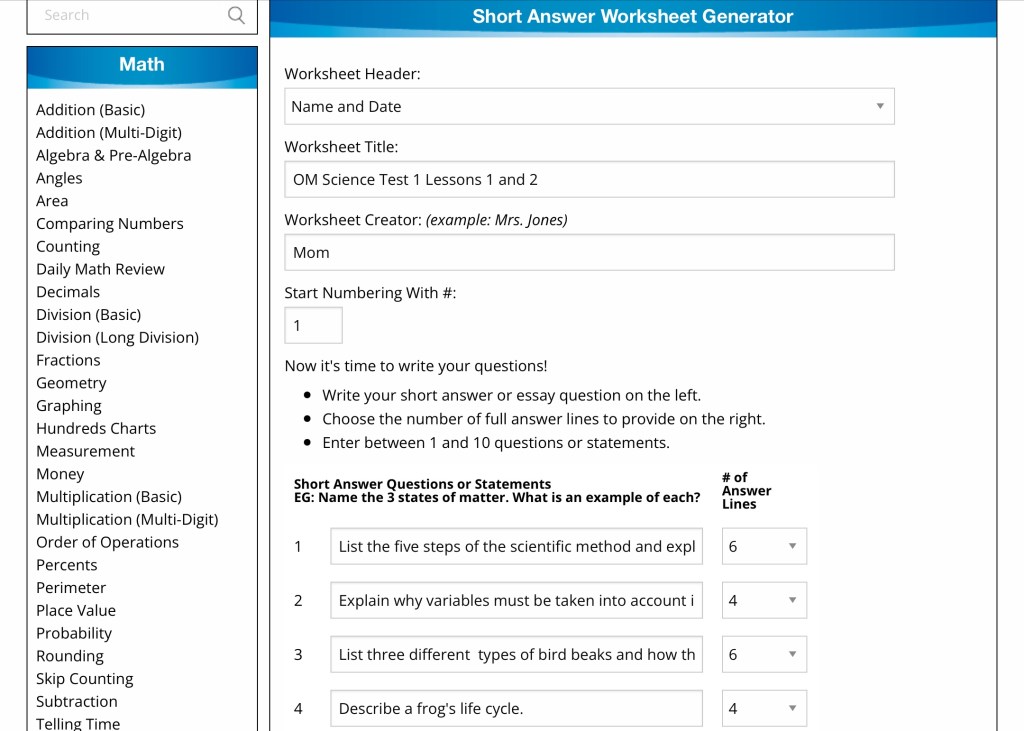
We have reviewed Super Teacher Worksheets previously with the Homeschool Review Crew, so I know my way around the website pretty well. If you are new to the website you will find it easy to navigate and you will come to appreciate the File Cabinet feature that helps you keep your saved resources organized. One of the features I am loving this year is the Worksheet Generator.

Super Teacher Worksheets worksheet generator has been my go-to for planning this year. Our spine curriculum this year is literature and research-based. My son is really enjoying all the hands-on activities, but there are a few things I would like to add to it such as some written activities for his vocabulary words, and extra resources on the topics he is studying about. The worksheet generator has been fabulous for creating my own crossword puzzles, word searches, ABC order, and quiz generator. The worksheet generator alone is worth the value of having a membership to Super Teacher Worksheets. I do like that the worksheet generator adjusts to the student’s grade level as far as the layout.

The other area I am really enjoying is the science resources, my son loves all things science. We are currently studying frogs and wetlands. I was dreading having to pin through the internet to find grade-appropriate materials to add to his lesson, but having the Super Teacher Worksheets saved me from hours of searching. The resources I found on frogs and the wetlands were exactly what was I looking for and my son was pleased with the content.

At the time of this review, Super Teacher Worksheets is $24.95 for a 1-year membership. The cost of this yearly membership is a super value and will fit most budgets. There are so many resources you will certainly find something of great use. For this mama, I am going to be using the worksheet generator a ton. If you would like to learn more about what the Crew has to say about Super Teacher Worksheets be sure to click the banner below.

Social Media Links:

Facebook: https://www.facebook.com/superteacherworksheets/
Twitter: https://twitter.com/SuperTeacherWks
Instagram: https://www.instagram.com/superteacher_worksheets/
Pinterest: https://www.pinterest.com/superteacherwks/

5th Grade, Education, Family, Homeschool, Teaching Resources

HUE HD Pro Camera Review!

Complimentary product received from HUE!

When the pandemic struck I was teaching at my son’s homeschool co-op. After several weeks of trying to pull things together for our students, we ended our school year on a sad note. Then Fall 2020 came and like many schools, homeschool co-ops turned to virtual teaching so we could stay connected with our students. Fast forward 9 months and teachers across the country had learn to adapt and come up with some innovative ways to teach online. I happened to follow one great teacher on Instagram and she spoke highly of the HUE HD PRO Camera. Teachers commented on the post saying the same great things about HUE HD PRO Camera. I knew I needed to get one of these because I was also teaching online and needed a better way to present lessons.

When I was approached to review HUE HD PRO Camera I was overjoyed because this has been on my list to purchase as soon as I could.

HUE HD PRO Camera is super simple to set up and can be used on PC and MAC computers, be sure to check your system with the HUE HD PRO Camera system requirements. I first set it up on my son’s PC because he has already told me that he is using it for stop animation, so I went ahead and downloaded the software for him and HE showed me how to use the camera. Then my husband got wind that I was setting up on my son’s computer and he insisted he was next on his MAC so he could use it for recording music production tutorials. Later I set it up on my computer to try out with my summer virtual students.

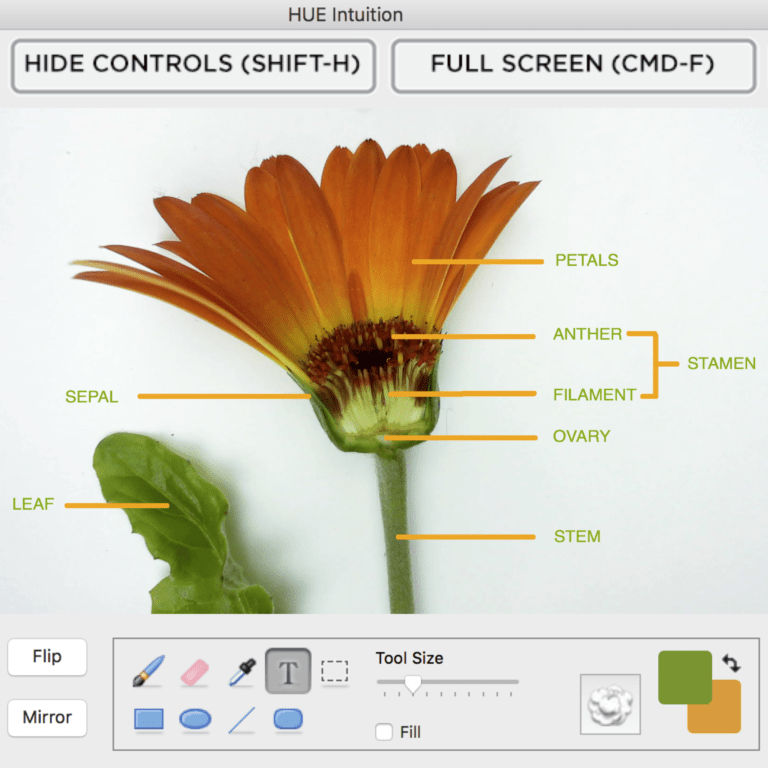
HUE HD PRO Camera includes a flexible body and stand, you can use the camera while on the stand or attach it directly to your computer. The camera can capture a standard size document or A4. With manual focus and magnification, you can use up close with objects for demonstrations. HUE HD PRO Camera uses a high-quality microphone and LED lights. The additional HUE INTUITION software is spectacular for teaching allowing you to be able to “annotate and manipulate the live video stream”. The HUE INTUITION software also allows you to:

  • Record Videos
  • Scan documents
  • Image Capture
  • Skype

I am super impressed using it with one of my virtual students I tutor he likes to have a visual of the page we are working on so he can find the page faster in his book and we can work together. Now before having the HUE HD PRO Camera I had to scan the sheet then upload it to my computer, then try to work on the sheet with him using annotate in Zoom while trying to manage my teacher’s manual. Now all I have to do is turn on my camera share screen and place the page in a sheet protector and slide under HUE HD PRO Camera and keep it moving. No more scanning and weird clumsy writing with annotating.

HUE HD PRO Camera is a really great addition to our homeschool and my teaching online. I am still learning my way around HUE INTUITION so I can really use the software to make things easier for my students and my son. At the time of this review HUE HD PRO Camera is $79.95 and it comes in four cool colors. You can also project on whiteboards and projectors, this is definitely a must-have for back to school for teachers. If you are looking for a gift to give your student’s teacher I recommend HUE HD PRO Camera they will love it.

Until the Next Time,

Mom and J