1st Grade, 2nd Grade Curriculum, 3rd Grade Curriculum, 4th Grade, Education, Math

Math Essentials Speed Wheel Drills! : Addition, Subtraction, and Multiplication Wheels

Disclosure: I received this complimentary product through the Homeschool Review Crew.

Math fact fluency is one of those skills students need practice on a regular so they continue to be proficient. I was super excited about the crew reviewing the Math Essentials Speed Wheel Drills!

Can I just say my son loves speed wheel drills. This year we had to make a change in his math curriculum and one of the things he loved was the speed wheels. When the Math Essentials Speed Wheel Drills arrived and he flipped through the books he was super excited. I dont know what it is about math facts being in a wheel makes him love fluency work but he loves them.

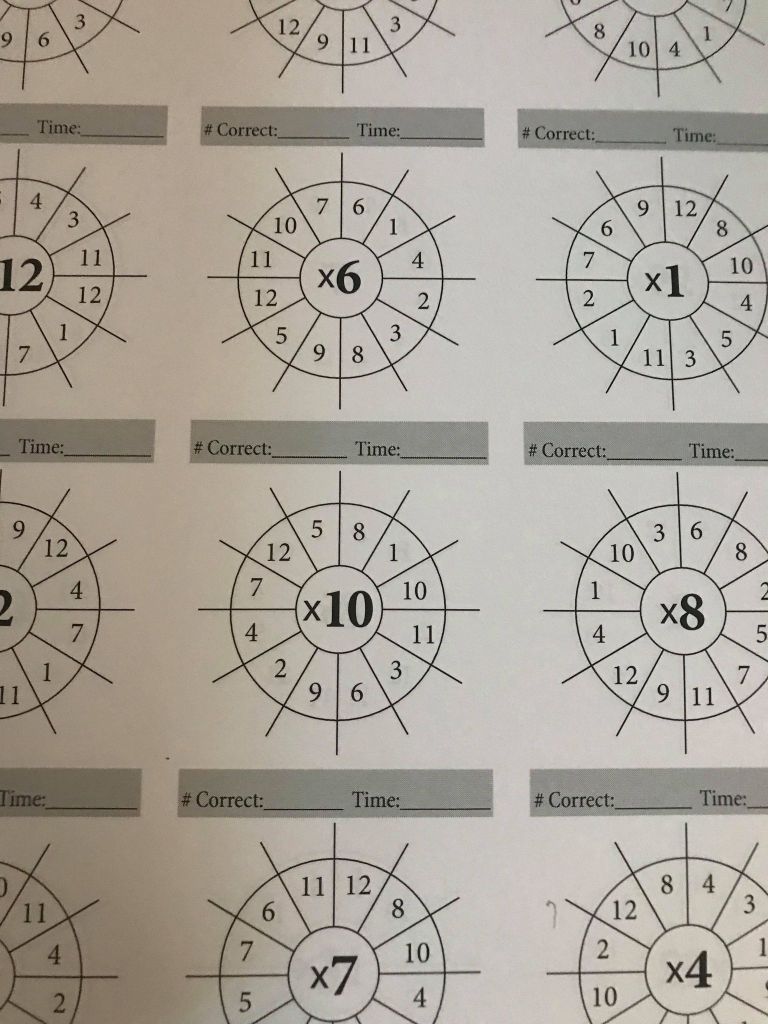
We were sent the Addition, Multiplication and Division Math Essentials Speed Wheel Drills! Each books comes with 1,440 speed wheel drills. The book also gives parent 21 tips math tips, instructions on how to use the books. Parents can time students or they can be not be times. I am personally noticed that my son has anxiety when things are timed so I dont time him. Each page has 12 speed wheels we did 1 row a day for 4 days a week. We used the Multiplication Math Essentials Speed Wheel Drills but as we move into our home school year I plan to assign a different book for a day of the week because I want him practice all 3 books.

The Math Essentials Speed Wheel Drills can be done in any direction the student wants to start in. The layout is simple the fact family number is in the middle of wheel and the student goes around the wheel preforming the correct operation. My son said he likes the Math Essentials Speed Wheel Drills because they aren’t boring. He said he doesn’t like the fluency sheets that are rows after rows of facts. The speed wheels aren’t in order so they kids will practice random fact families each wheel.

So now that we have found Math Essentials Speed Wheel Drills Addition, Multiplication and Division my son’s favorite way to practice his fact fluency, we are happily spreading the word about these books to friends and family. Be sure to check out the other crew’s reviews on Math Essentials Speed Wheel Drills by clicking the banner below.

Critical Thinking and Logic, Curriculum, dyslexia, Homeschool, Orton-Gillingham, Reviews

Dyslexia Gold Review !

Disclosure: I received this complimentary product through the Homeschool Review Crew.

It it that time of year in which parents are looking for supplements to add to their students learning. One the programs we are review for the crew is Dyslexia Gold . Some of you may remember we reviewed this online platform last year. We were happy to review it again over the summer and continue to use it this upcoming school year.

Speaking of assessments that one of the great things about Dyslexia Gold student are able to take an assessment when they first log into the Dyslexia Gold student profile. Dyslexia Gold scan for reading, spelling, and fluency. There is also a dyslexia screener for students 6+ this screener is designed to screen for dyslexia indicators. The dyslexic screener is not to replace a professional screening , but it is a starting place if you may suspect your student may be dyslexic.

The parent dashboard gives you a detail report of the assessment as well as recommendations of what programs for your student to use. Dyslexia Gold is for ages 6-16. While older students can us the program the reading age test will only assess up to 11 yrs 6 months, the spelling test assess up to 16 years.

The programs within the Dyslexia Gold platform include:

  • Vision Training (Engaging Eyes and fun visual games)
  • Fluency Builder ( phonological awareness, reading fluency, and sight words)
  • Spelling Tutor ( dictation and grammar practice)
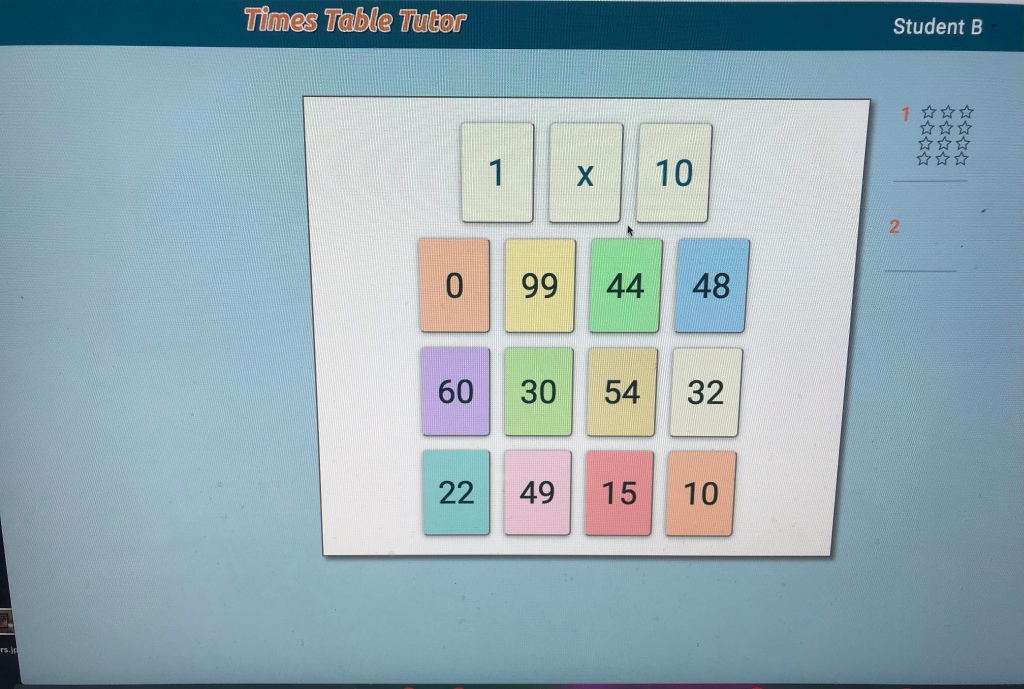
  • Times Table Tutor (flash cards, grouping, and story problems

My son enjoyed playing the visual games. I personally like these games because my son has what is called “slight lazy eye” and this program is great for him and strengthening his eye muscle. We will be using this program on a regular basis. He used the times table tutor a few times but he is pretty fluent with his multiplication so he didn’t use it as much, but I will have him hop on it once a week. Dyslexia Gold recommends students log in 2-5 times a week for 20 minutes.

The fluency builder was a nice review for phonics and reading fluency practice. My son did a few struggle with understanding word builder when needing to change words to different words. The nice thing about the spelling tutor is that it has some great educational passages for the kids to read, students are given and opportunity to read the passage non-timed and then the next screen times them when they are ready to start reading. The fluency teaches students new vocabulary words and definitions. At the end of the lessons student will review the previous lesson which I think is great because it keeps the students practicing what they have already learned.

The spelling tutor is where we spent a lot of our time. The spelling tutor is a great tool for students correct their sentence structure, spelling and grammar. The way the spelling tutor works is students here the sentence and then they write the sentence. The next screen has the students check their papers with the screen. Students are given a grammar areas of focus on while working in the spelling tutor, we worked on homophones during this review period.

We did run into some snags occasionally the program would glitch in the middle of lessons of game play. I also noticed that the reporting log-ins weren’t accurate. We logged in a few times and it didn’t record the day or it would record the following day’s date instead of the present date.

Overall I think Dyslexia Gold is a great online platform for both dyslexia and non-dyslexia students. It is a great program for reviewing and sharpening skills. Be sure to check out the rest of the crew’s reviews by clicking the banner below.
Social Media Links

Facebook: https://www.facebook.com/DyslexiaGold

Uncategorized

Bethany House Publishers: Help Your Kids Learn and Love the Bible Review!

Disclosure: I received this complimentary product through the Homeschool Review Crew.

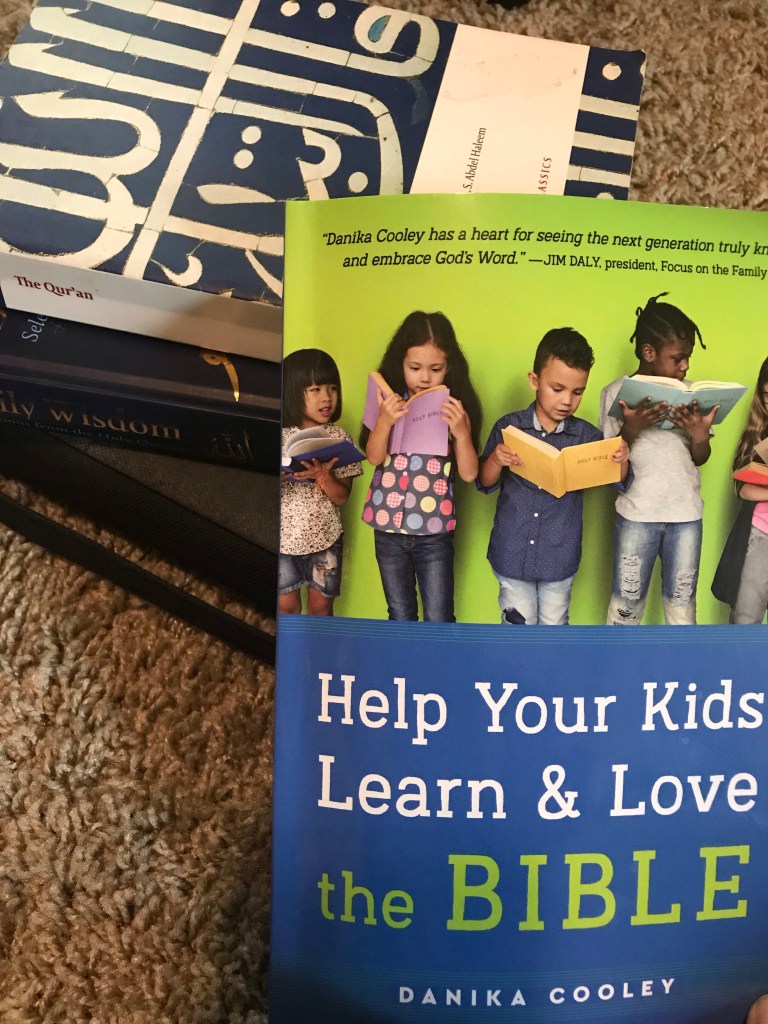
We have been on a journey of learning about world religions and I have been collecting resources I would like to consider for our upcoming world religious studies. One the resources I have been reviewing for the crew is Bethany House Publishers Help Your Kids Learn and Love the Bible.

Help Your Kids Learn and Love the Bible written by Danika Cooley helps parents navigate through teaching their children the Bible. The book hopes to inspire parents to introduce the teachings of the bible in the way children will learn ad love the lessons. Help Your Kids Learn and Love the Bible starts with a brief introduction and ends with a brief description of the author.

Help Your Kids Learn and Love the Bible is written from a Christian perspective, the book is broken down into 3 parts. Part 1 You’re the Leader in this section of the book parents will grow their confidence and knowledge in the Bible and how to present its teachings to their children. You’re the Leader also gives parents helpful strategies for time management and problem-solving.

Part 2 Faithful Reading this section is key for those who need encouragement for reading the Bible. This section also inspires parents to really study their Bibles and learn the messages so they can pass this information to their children. This section also helps the reader understand that bible is broken down into what can be called different genres like how books are organized in a library.

Part 3 A Daily Walk the last section in this book drives on families reading the bible together, studying, prayer, and really teaching the student that their faith is a way of life and requires devotion and the continued love.

Help Your Kids Learn and Love the Bible book is paperback and with medium print. The book is a quick read and can be used as a quick reference book for encouragement. The book offers real-life scenarios examples and how to manage these scenarios. The book offers helpful goal-setting, memorization, and organization techniques. I saw references from bible scriptures, quotes from different pastors, notes for reference, and works consulted.

I used this book for research purposes for our world religious studies unit. I did not share my research with my student. This may be a good book for a family looking to start biblical teachings with their students or need to refine their lessons.

At the time of this review, Help Your Kids Learn and Love the Bible cost is $11.99. Be sure to check out the other crew’s reviews by clicking the banner below.

Social Media

Facebook: https://www.facebook.com/BHPnonfiction
Twitter: https://twitter.com/bethany_house
Instagram: https://www.instagram.com/bethany_house_nonfiction/
Pinterest: https://www.pinterest.com/bethanyhouse
YouTube: https://www.youtube.com/user/bethanyhouse

Facebook: https://www.facebook.com/DanikaCooleyAuthor
Twitter: https://twitter.com/DanikaCooley
Instagram: https://www.instagram.com/danikacooleyauthor
Pinterest: https://www.pinterest.com/danikacooley/_created/
YouTube: https://www.youtube.com/c/DanikaCooley

Family

Fermentools Starter Kit Review!

Disclosure: I received this complimentary product through the Homeschool Review Crew.

I was really excited about being able to review Fermentools starter kit again this year. We were sent the Fermentools starter kit and it great to have 2 starter kits this time around because that means we can ferment more items in less time.

What does it mean to ferment ? “Fermented foods are defined as foods or beverages produced through controlled microbial growth, and the conversion of food components through enzymatic action.”

Why are fermented goods good for your family you may ask, fermented foods when done properly are good for overall gut health by creating those good bacteria to promote healthy digestion and boost immune support.

Fermentools starter kit is a easy and safe system your can use at home and takes the guess work out if you are doing the process correctly. The starter kit comes with:

  • 1 Stainless Steel Lid (Fits Wide Mouth Mason)
  • 1 Glass Fermentation Weight
  • 1 Airlock
  • 1 Rubber Stopper
  • 1 Rubber Canning Gasket
  • Himalayan Powdered Salt

If you are familiar with fermenting you gather your supplies plus your Fermentools starter kit and you are all set. If you aren’t familiar with fermenting the company includes booklet with instructions and simple recipes to help get your started. Fermentools website is packed with information on fermenting and the availability of extra supplies if needed. Fermentools also has a blog that has wealth of information and recipes.

For this review I made fire cider this isn’t recipe listed on the blog, but I used the Fermentools starter kit to make our fire cider and it cam out delicious. Every year Ipay a close friend to make our family some fire cider for the upcoming cold/flu season. I have never made it before because I have always been a little scared of the process. Fermentools starter kit took away my fears and my fire cider came our delicious and I will be making another batch and batch to give away to my family.

At the time of this review Fermentools starter kit is $21.49 such a low cost for such a great health benefit. The company has great customer service and the process is super easy. I think my next project will be the Ginger Bug recipe on Fermentools blog. Be sure to check out the rest of the crews reviews on Fermentools starter kit by clicking the banner below.

Social Media Links: Fermentools

Facebook: https://www.facebook.com/fermentools/
Pinterest: https://www.pinterest.com/fermentools/pins/

Uncategorized

Creating a Masterpiece: Art History Program Review!

Complimentary product received from the Homeschool Review Crew.

Over the last few months I have been teaching art class to some homeschool students virtually. Now that homeschool year is over and my students are enjoying their summers, I miss doing art weekly. When the Crew was presented the opportunity to review Creating A Masterpiece Art History Program I jumped at the opportunity to review the online art program.

Creating A Masterpiece has Core, Drawing, Art in History, and Capstone Levels in their online studios, but for this review I will be reviewing the Art History Program . The Creating A Masterpiece Art History Program is designed to not be a history lesson but to teach students the ability to do art from a certain historical time period. The Art History lessons are broken up until different subject matters:

  • Style of Art in History (25 topic lesson)
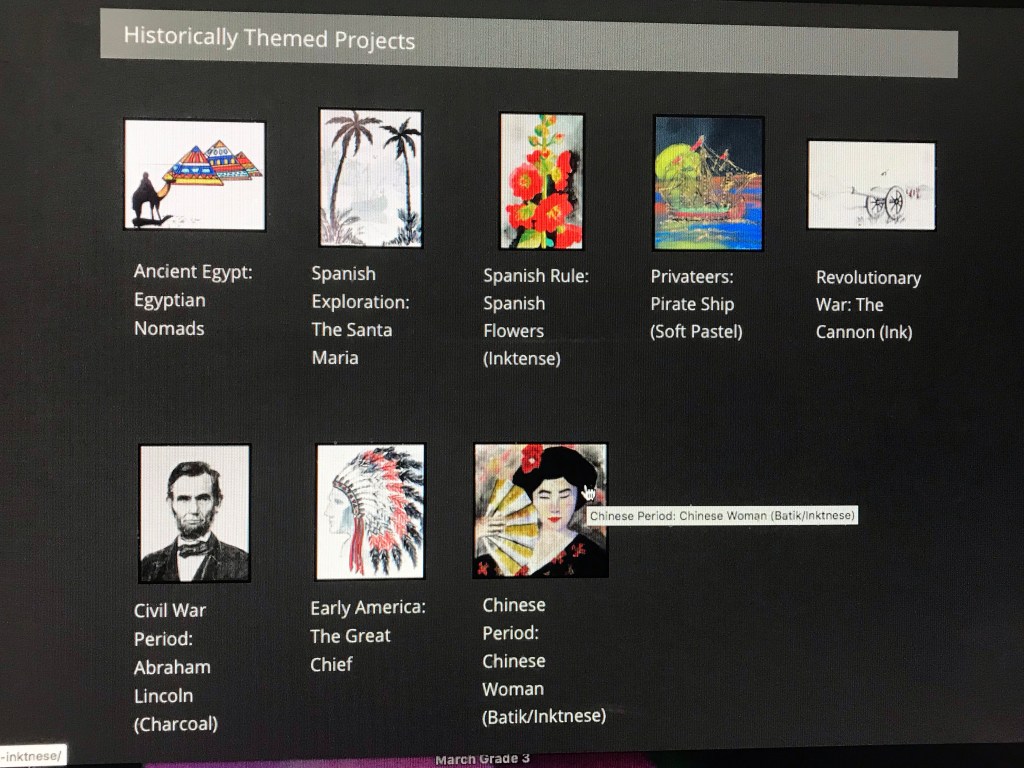
  • Historical Themed Projects (8 topic lesson)
  • Exploring the Art of Yesterday (1 topic lesson )
  • Capstone Program (1 topic lesson)

Each Creating A Masterpiece topic lessons is divided into easy to follow step by step instructional video. The instructor is friendly and informative, students can stop the video as they need to as they create. The topic lessons come with a supply list and there is also an option for you to purchase what you need directly by clicking the provided link. Creating A Masterpiece Art History Program is for ages 5 thru 13+. The Capstone program is for more advance art students. The Creating A Masterpiece Art History Program is meant to for students to be able to work independently.

How we used Creating A Masterpiece Art History Program at first I tried to get my son interested in trying out a few lessons. My son choose to do the Ancient Egypt: Egyptian Nomads and the Pop Art: The Flower Pot (Colored Marker) I tired my hand at the Romanesque Period: Rose Window (Colored Marker) . We didn’t need to purchase a lot of the art materials because I have already invested in high quality art supplies, so we didn’t need to purchase. My son enjoyed the Egyptian Nomads piece but he did have to stop several times in order to keep up. He said that he wished that the artist slowed down a little when drawing the nomad. He worked stayed positive and worked his way through the project. Pop Art: The Flower Pot (Colored Marker) project was a little different for him he gave up in the middle after drawing the petals and him and I worked on the project together, so we could complete it.

Romanesque Period: Rose Window (Colored Marker) piece I am still working on it is a pretty intense project that requires the use lots of different straight edges and the use of compass. I think once I am finished it will be a pretty piece. The Styles of Art in History area in the Creating A Masterpiece Art History Program is for ages 5 and up, but I honestly do not see a child of 5 years being able to do the projects unless they are artistically gifted or they like art. Creating A Masterpiece Art History Program I feel like is a really nice art program for students who really have a strong background or love of art. My son was interested in some of the other studio areas available through Creating A Masterpiece .

I would recommend this program for an artistic family I think they would really get the benefits from this program and add it to what they are learning in history. I would have like to seen more cultural art history. At the time of this review monthly or yearly subscriptions for $29.99/month or $299/year. Be sure to check out the other Crews reviews by clicking the banner below.

Social Media Links:

Facebook: https://www.facebook.com/createamasterpiece

YouTube: https://www.youtube.com/channel/UCyDU-6301Pwj_1Dez9YkumQ

4th Grade, Education, Family, Math, Reviews

CTCMath Review!

I received this complimentary product through the Homeschool Review Crew.

This one of my favorite reviews to write every year with the Crew. My son has been using CTCMath for the last 4 years and couldn’t be happier with this online full online math curriculum for grades K-12 including Calculus. We received a 12 month online subscription that we are going to full take a advantage of this school year.

CTCMath is a complete math curriculum right at your child’s finger tips. There is no extra textbook to purchase or tutor to hire. Students will get the benefit of working at their own pace and knocking out their math requirements. The program is easy to use and the parent dashboard gives you detailed reports on your students progress and areas of weakness to help you plan and adjust your lessons plans. The program is not just for homeschoolers, if traditional students need extra practice in math or more rigor they can use this program.

The CTCMath gives you access to all grade levels, no more being locked in a specific grade, parents can have their students practice lower grade levels or higher grade levels as they may need. The online per-recorded instructional videos prepares your student for the concept they will be working on. If a student needs some 1:1 help you can customize worksheets using the Questions Bank Wizard.

Now that I have given you a little insight into CTCMath let me tell you how we have been using it and what my plans are for the rest of the year. We have math curriculum that is our spine but CTCMath has been included into that spine as well. CTCMath will be used to help introduce new upcoming concepts to my son on the weekends. I know what you are thinking she really has him doing school on weekend, um YES ! CTCMath exercises are quick and take maybe at the most 10-15 mins to complete so at some point over the weekend I ask my son to hop on and do the area I have assigned for him. That brings me to another great capability you can assign areas you want your student work. Why do I do this because it lets me know exactly how much he already knows and where I need to focus my attention on.

What I like about CTCMath is their philosophy about math “We believe in the importance of teaching Math the traditional way, so we are not aligned with common core.” This philosophy alone is what makes this company stand out they are committed to meeting students where they are at and letting them learn math the traditional way.

CTCMath is a one stop math online math curriculum, it also offer placement test, fluency practice and detailed PDF reporting. With weekly revision sets that help identify learning gaps and great customer service CTCMath is all you need to start your journey of math lessons or just to supplement. CTCMath is reasonably priced and they offer monthly and annual rates, there is even a homeschool family discount. Be sure to check out the other Crews reviews on CTCMath by clicking the banner below!

Social Media Links

Facebook: https://www.facebook.com/ctcmath
Twitter: https://twitter.com/ctcmathofficial
Instagram: https://www.instagram.com/ctcmath
Pinterest: https://www.pinterest.com.au/ctcmath/
YouTube: https://www.youtube.com/channel/UCWn5e6974bpIEAe46VnovZw

3rd Grade Curriculum, Curriculum, Education

Home School in the Woods: Lap-Pak: Wonders of the World Review!

Disclaimer: I received this complimentary product through the Homeschool Review Crew.

I am always looking for a way to make out homeschool more interesting and hands on. The crew was giving the opportunity to review several of the wonderful resources from Home School in the Woods for this review I choose to review Lap-Pak: Wonders of the World a digital pdf.

Lap-Pak: Wonders of the World is a wonderful resource that allows students to explore the worlds wonders right in their home. Students will focus on the worlds wonders from 4 time period Ancient, Medieval, Modern and Natural. What I like about the Lap-Pak: Wonders of the World is that students can use these wonders to cover history and science. Lap-Pak: Wonders of the World is meant to be put together as lapbook, but because I know my track record with lap books I decided to use the Lap-Pak: Wonders of the World as interactive notebook.

I separated the wonders according to their academic topic. So we have one notebook for science and one for history. We currently studying the ocean and geology so I pulled out the Great Barrier Reef and Grand Canyon for my son. I decided to put the Great Barrier Reef in the science notebook and Grand Canyon in the history. Lap-Pak: Wonders of the World added historical information in to the Grand Canyon such as about the Indigenous People. Can I just say I was very happy that Home School in the Woods used the correct term Indigenous People and showed them proper respect in history.

Lap-Pak: Wonders of the World includes activities timeline of the Wonders of the World as well as all the Ancient Wonders. I love the mix of combining all the time periods in the Lap-Pak: Wonders of the World . I decided against putting them all together rather than building our interactive notebook as we studied them so my son can use the extra pages in the notebook to add to the wonders we study. Lap-Pak: Wonders of the World provides all you need to put together a great lapbook, there is plenty of coloring, information, creative writing and templates for the kids explore the 23 projects. Lap-Pak: Wonders of the World is east to put together with the easy instructions provided. Students can put the Lap-Pak: Wonders of the World together on their own or with assistance from their parents.

Lap-Pak: Wonders of the World is a great resource for homeschoolers or non-homeschoolers, it provides a great supplement to history and science education. At the time of this review the cost for Lap-Pak: Wonders of the World is $18.95. Home School in the Woods offers several other fun filled Lap-Paks and resources be sure to check out the Crew reviews of these resources by clicking the banner below.
Until The Next Time

Mom!

Social Media Links:

Facebook: https://www.facebook.com/homeschoolinthewoods/
Twitter: https://twitter.com/HSintheWoods
Instagram: https://www.instagram.com/homeschoolinthewoods/
Pinterest: https://www.pinterest.com/hsinthewoods/_saved/
YouTube: https://www.youtube.com/channel/UCrKq6iLty2fpB6R6ZpcUb8A/videos

Education, Homeschool, Language Arts, Reviews, spelling

EdAlive: Words Rock Online Review!!

Disclosure: I received this complimentary product through the Homeschool Review Crew.

We finished off our language arts curriculum in early May and the crew was offered an opportunity to review EdAlive Words Rock Online and I thought this would be a fun way to prevent the summer slide with this online program.

Words Rock Online is an online vocabulary and language arts digital platform game. Students are given games to play similar to battleship and they can earn rewards. While Words Rock Online is set up like a video game for the students to capture interest the meat of the program works on the following skills:

  • Spelling
  • Grammar
  • Vocabulary
  • Punctuation and Literacy

My son who is a moderate gamer wasn’t very much interested in the games, I suspect it may have been just his willingness to learn how to play the slug game. He decided to work on the academics parts instead to my surprise.

Words Rock Online is designed for students ages 5-15 and it adapts to the students the students progress. We saw a lot grammar that my son has covered over this school year and previous years. The program isn’t a teaching program in my opinion it really is more so of a review. I think if students haven’t had a lot of exposure to grammar concepts they may find this program a little difficult to maneuver, but for those students who have a had a strong grammar foundations this program is wonderful for reviewing and keeping those skills sharp. Students are giving to chances to get theirs answers correct, before they move on. I wish that there was a explanation for the correct answers. Parents can check out their students progress and achievements in the parent dashboard, which is nice and can help you with your planning. We will continue to use Words Rock Online for our 4th grade year to help review

At the time of this review the cost of EdAlive Words Rock Online is $90/year with a monthly options for each child. EdAlive also has two more online programs be sure to check out those the reviews by clicking the banner below.

Social Media Connections

Facebook: https://www.facebook.com/EdAlive
Twitter: https://twitter.com/edalive
Instagram: https://www.instagram.com/edalive_onlinelearning/
Pinterest: https://www.pinterest.com.au/edalive/
YouTube: https://www.youtube.com/EdAliveTube

Curriculum, Education, Homeschool, Read Alouds

One More Story Review!

DISCLAIMER: I received this complimentary product through the Homeschool Review Crew.

We love a great picture book in our home, but as my son has gotten older and reads more chapter books with less pictures we haven’t read many lately. I was delighted when the crew was given the opportunity to review a one-year subscription to One More Story .

One More Story is an picture book digital platform available on IOS app and website . Students are able to explore to array of picture books that are vividly pleasing . There over 75 books to choose from that are read aloud to your student. When logging in you will immediately notice the books are divided into different bookshelf tabs. Students will see the full display of the book and can have the title read to them by clicking on the books and when the student is ready to read they just click the green button and the book starts.

Students have 2 options when starting the book they have it read to them or they can click “I Can Read” . There also vocabulary button that will show the vocabulary words for that book and students will be able to see and hear the meaning of the word and a preview of the sentence from the story.

One More Story is a great program for early readers or if just want to get in some more read aloud time with your students. The word tracking in the story helps student to learn new vocabulary. I really like how the books have background music playing. Seeing such a great variety of books took use down memory lane.

My son loved using One More Story he at first was hesitant because of course he is a big time 4th grader who doesn’t have time for picture books, but then he spotted one of his favorite picture book Little Melba and Her Big Trombone. This book is what inspired him at 3 years old he wanted to plat the trombone. He was so happy to see the book he has listened and read it to me several times. Then we were doing an art study on Bill Traylor and I forgot to pick up the book to go along with our study and then I saw “It Jas Happened: When Bill Traylor Started to Draw on One More Story . As we were starting to study Asia in geography and in our grammar curriculum we found Grandfathers Journey as well. It has been so nice to be able to have picture books back into rotation in our home. Thanks One More Story for bringing picture books back to our homeschool.

At the time of this review the cost of a one year subscription is $45.99. Be sure to check out the rest of the crew reviews on One More Story by clicking the banner below.

Social Media Links:

Facebook: https://www.facebook.com/LifelongReaders
Twitter: https://twitter.com/EarlyReader

1st Grade, 2nd Grade Curriculum, 3rd Grade Curriculum, Education, Family, Homeschool, Language Arts, Math, Reviews

Cross Seven Ventures – Homeschool Musical Memory Tool Review!

Disclosure: I received this complimentary product through the Homeschool Review Crew.

There is no secret that our family loves music if you follow me on all my social media platforms. One of the ways we make homeschooling fun and interactive is by including music. The crew was offered an opportunity to review Cross Seven Ventures – Homeschool Musical Memory Tool. Each reviewer was given a 1-year subscription to acess the program online.

Cross Seven Ventures – Homeschool Musical Memory Tool is for children in grades K-6 it covers subjects Timelines, History, Science, Math, English Grammar, Latin, Geography, Hymns, and Scriptures. The program has 4 cycles to help the children build a solid foundation. There is a parent dashboard in which you can track each students progress and interactive quizzes.

For this review we used the Math and English Grammar memory work. The English Grammar section really was nice way to review old concept mastered and new grammar concepts. What I did to make this more helpful for my son is I went through his grammar curriculum and paired the weekly concept with a Cross Seven Ventures – Homeschool Musical Memory Tool English Grammar song and we used that all week at the beginning of our lessons. There were times when we had more than 2 concepts and we learned the songs for those concepts. There were a few times I would hear him humming the songs while he was working on his lesson independently. I did notice that over the few weeks have been using the Cross Seven Ventures – Homeschool Musical Memory Tool for English Grammar his need for me to review or assist him was less.

For Math, we used Cross Seven Ventures – Homeschool Musical Memory Tool in the same way as English Grammar but I was able to skip several of the earlier weeks and find the memory work areas that he really needed help with and this mom was in panic mode about teaching. Cross Seven Ventures – Homeschool Musical Memory Tool made teaching my son fraction conversion to decimals a BREEZE! This mama was in panic mode 2 weeks ago when I saw fractions to decimals conversions come up in his curriculum. I prepped for the week and braced for the upcoming lesson, sure enough, I put the song on and we started the lesson and instantly he understood the concept and kept moving along. I think the one thing I would like to see included in the memory work math would be integers and exponents.

Cross Seven Ventures – Homeschool Musical Memory Tool does have a Christian foundation, but we only used the math and grammar and for those wondering if there were faith-based items in the sections, we used I didn’t encounter them. There are fun links included in each cycle for the kids to explore outside the memory work. Students can earn badges as they work through the memory work and quizzes.

Cross Seven Ventures – Homeschool Musical Memory Tool worked well for my son because he is an auditory and visual learner. The songs are short and easy to learn, I do like the videos that follow the songs as they play because it gives a nice visual for the children. I also like the option that all the memory work can be done in each cycle can be done by the week or you can pick the ones that work for you. I plan to continue to use this over the summer as part of our summer homeschool daily do’s to help prevent summer slide.

Cross Seven Ventures – Homeschool Musical Memory Tool is tablet and mobile-friendly “there are streaming channel apps on AppleTV, Roku, and FireTV, which are great for allowing the whole family to easily see the programming content.” At the time of this review, the cost for a 1-year subscription for all 4 cycles is $439.99. If the 1 year subscription doesn’t fit your family’s budget there is monthly and yearly subscriptions for each cycle. Be sure to check out the other crew’s reviews on Cross Seven Ventures – Homeschool Musical Memory Tool by clicking the banner below.

-Mom

Social Media Links: Cross Seven  – Musical Memory Work

Facebook: https://www.facebook.com/CrossSevenVentures
Twitter: https://twitter.com/Cross7Memory
Instagram: https://www.instagram.com/crosssevenventures/
Pinterest: https://www.pinterest.com/CrossSevenVentures/
YouTube: https://www.youtube.com/c/CrossSeven